mQuest Webhooks
Revision History
| Version | Date | Description |
|---|---|---|
| 0.1 | 2021-07-20 | First draft by Christian Herrmann |
| 1.0 | 2022-01-01 | Peer reviewed by Kristian Ferkić |
| 2.0 | 2022-08-01 | Major update to the JSON payloads: result, media & result-with-media Added section 1.7 Compatibility |
| 2.1 | 2025-04-25 | Added staged-media events by Kristian Ferkić |
Introduction
mQuest webhook is part of an inter-system communication between three components. One being the customer’s system (providing an http-endpoint), the mQuest API (and the mQuest webhook).
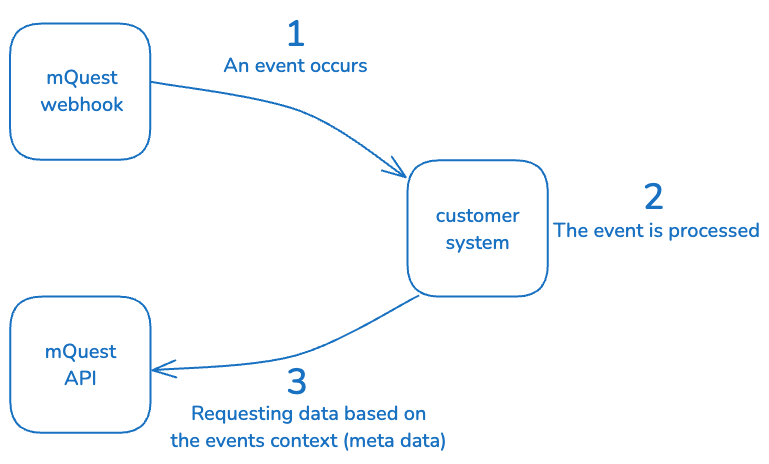
The mQuest webhook delivers lightweight notifications proactively to the customer’s system. Notifications contain information (meta data) about events on the mQuest platform. Notifications are sent to an http-endpoint of the customer’s system and deliver a JSON payload. After receiving a notification the customer’s system can use the mQuest API to process the information for its individual use-case.
1.1 About events
On the mQuest platform there are a lot of events, that can be interesting, useful or even crucial for an external system (of a customer). E.g.
- A project has been updated
- A task has been deleted
- A new data set is available (i.e. has been transferred from a mobile device)
The entire list of available events that can trigger notifications can be found on the following pages.
1.2 About notifications
Notifications contain very little data in order to remain lightweight. Their purpose is to inform the customer’s system.
The JSON payload for an event indicating a new data set is available looks like this:
Text behind the double-slash serves as explanation and is not part of the payload
{
  // Your tenant number on the mQuest platform
  "tenant": "0000001",
  // Indicates the notification is about a new data set (UPDATE or DELETE are also possible operations on any resource)
  "operation": "CREATE",
  // Indicates a data-set and all the corresponding media-file (e.g. photos) are available, i.e. have been transferred from the mobile device. There are also dedicated events for only the data-set and each media-file.
  "resource": "result-with-media",
  // The exact time the event occurred.
  "timestamp": "2020-09-07T17:35:00Z",
  // The _links (individual for every resource) lead to the mQuest API.
  // More on links below in 1.3.
  "_links": {
    "self": {
      "href": "https://0000001.cluetec.com/api/core/v3/projects/Customer-Survey/results/999"
    },
    "results": {
      "href": "https://0000001.cluetec.com/api/core/v3/projects/Customer-Survey/results"
    },
    "project": {
      "href": "https://0000001.cluetec.com/api/core/v3/projects/Customer-Survey"
    },
    "task": {
      "href": "https://0000001.cluetec.com/api/core/v3/tasks/4711"
    }
  },
  // As for every resource, there are attributes that are specific to the resource. The following attributes are specific to the result(-with-media) resource.

  // Meta information about the corresponding task
  "task_id": 4711,
  "task_namespace": "company-api",
  "task_specifier": "571cd19b-d40a-4e6f-a36e-270fdfbd9475",
  "task_version": 1,
  "task_status": "IN_PROGRESS",
  // The name of the corresponding project (questionnaire) the data set belongs to.
  "questionnaire": "Customer-Survey",
  // The version of the corresponding project (questionnaire) the data set belongs to.
  "questionnaire_version": 42,
  // The ID of the user conducting/synchronizing the data set
  "user_id": "1264e9b8-e97f-4c28-92aa-703d12e853b7",
  // The (unique) ID of the data-set
  "id": "bWVkaWEtdGFnc3wyMTY0Ng==",
  // The legacy (numeric) ID of the data-set
  "result_id": 999,
  // Indicates if the data-set has been ignored (probably only relevant for the UPDATE operation)
  "ignored": false,
  // Indicates the data set has been canceled (if true)
  "canceled": false,
  // Status information of the result
  "status": "COMPLETED",
  // Meta information about the data-set ONLY available with result-store persistence
  "stats": {
    "total_response_count": 99,
    "hidden_response_count": 2
  },
  // Meta version of the webhook itself
  "__version__": 2
}
1.3 About links (mQuest API)
Most of the times, receiving a notification is only the first step in the process. E.g. after being informed about a new data-set (result-with-media), you probably want to load the actual data-set (and all its media-files).
You do this using the the mQuest API
Now the_links attribute in the payload already contains the most commonly used endpoints for the corresponding resource and serves as a suggestion on how to proceed. However, depending on you use-case and process, feel free to use any endpoints that serves you.
1.4 Configuration
It is important to know, that you are free to choose, about which events you want to be notified. Not only can you “subscribe” to notifications about certain resources, you can also combine the configuration with the operation that is relevant for you.
Available combinations are:
| resource | CREATE | UPDATE | DELETE |
|---|---|---|---|
| result | x | x | x |
| result-with-media | x | ||
| media | x | ||
| staged-media | x | x | x |
| task | x | x | x |
| questionnaire | x | x | x |
| ride | x | ||
| group | x | x | x |
| user | x | x | x |
1.5 Authentication
This is about supported authentication on the endpoint that is exposed in the customer’s system. The configuration of the webhook is capable of applying any http-header. I.e. we can send BasicAuth or an API-key with the notification requests. Certificate based authentication (mutual TLS) is not supported yet.
1.6 Error handling
If a notification for any event couldn’t be sent to the endpoint of the customer’s system (e.g. there has been a connection timeout or the http-response-code was not in the allowed 2xx-range), mQuest webhook will retry after 15 minutes. Failing attempts will be retried 1500 times, every 15 minutes (which is aprox. 15 days). If the event couldn’t be delivered after 1500 retries, the event will be discarded.
1.7 Compatibility
Additional attributes in the payload are not considered a breaking change. I.e. when serializing the JSON payload, use a configuration that ignores unknown attributes. Existing attributes will neither be changed nor removed.
Documentation
On the following pages, you’ll find example payloads for every resource including a detailed description for each attribute.
2.1 result
This event is about the data set and only the data set, i.e. if the data set contains media file (e.g. photos) - for the CREATE operation - you will receive a notification even before all the corresponding media-files are available. Regardless of media-files you will receive notifications, once the result has been updated (UPDATE operation) or deleted (DELETE operation). The event for a DELETE operation will only be published once a single data set has been deleted. If the project has been deleted, which implies deleting all data set. There will be only an event for questionnaire.
{
  // The attribtes "tenant", "operation", "resource" and "timestamp" are available for all resources. The description can be found in the example above in chapter 1.2.
  "tenant": "0000001",
  "operation": "CREATE",
  "resource": "result",
  "timestamp": "2020-09-07T17:35:00Z",
  // These attributes are the same for the resource "result" and "result-with-media". The description can be found in the example above in chapter 1.2.
  "task_id": 4711,
  "task_namespace": "company-api",
  "task_specifier": "571cd19b-d40a-4e6f-a36e-270fdfbd9475",
  "task_version": 1,
  "task_status": "IN_PROGRESS",
  "questionnaire": "Customer-Survey",
  "questionnaire_version": 42,
  "user_id": "1264e9b8-e97f-4c28-92aa-703d12e853b7",
  "ignored": false,
  "canceled": false,
  "status": "COMPLETED",
  "stats": {
    "total_response_count": 99,
    "hidden_response_count": 2
  },
  // The (unique) ID of the data-set
  "id": "bWVkaWEtdGFnc3wyMTY0Ng==",
  // The legacy (numeric) ID of the data-set
  "result_id": 999,
  // Detailed description about the mQuest API is available at https://api.mquest.de
  "_links": {
    "self": {
      "href": "https://0000001.cluetec.com/api/core/v3/projects/Customer-Survey/results/999"
    },
    "results": {
      "href": "https://0000001.cluetec.com/api/core/v3/projects/Customer-Survey/results"
    },
    "project": {
      "href": "https://0000001.cluetec.com/api/core/v3/projects/Customer-Survey"
    },
    "task": {
      "href": "https://0000001.cluetec.com/api/core/v3/tasks/4711"
    }
  },
  // Meta version of the webhook itself
  "__version__": 2
}
2.2 result-with-media
This event is about the data set and all the media-files (e.g. photos) that belong to the data set. This event occurs only once the data set and all the media-files are available, i.e. have been successfully transferred from the mobile device. I.e. this event occurs only in combination with the CREATE operation.
{
  // The attribtes "tenant", "operation", "resource" and "timestamp" are available for all resources. The description can be found in the example above in chapter 1.2.
  "tenant": "0000001",
  "operation": "CREATE",
  "resource": "result-with-media",
  "timestamp": "2020-09-07T17:35:00Z",
  // These attributes are the same for the resource "result" and "result-with-media". The description can be found in the example above in chapter 1.2.
  "task_id": 4711,
  "task_namespace": "company-api",
  "task_specifier": "571cd19b-d40a-4e6f-a36e-270fdfbd9475",
  "task_version": 1,
  "task_status": "IN_PROGRESS",
  "questionnaire": "Customer-Survey",
  "questionnaire_version": 42,
  "user_id": "1264e9b8-e97f-4c28-92aa-703d12e853b7",
  "ignored": false,
  "canceled": false,
  "status": "COMPLETED",
  "stats": {
    "total_response_count": 99,
    "hidden_response_count": 2
  },
  // The (unique) ID of the data-set
  "id": "bWVkaWEtdGFnc3wyMTY0Ng==",
  // The legacy (numeric) ID of the data-set
  "result_id": 999,
  // Detailed description about the mQuest API is available at https://api.mquest.de
  "_links": {
    "self": {
      "href": "https://0000001.cluetec.com/api/core/v3/projects/Customer-Survey/results/999"
    },
    "results": {
      "href": "https://0000001.cluetec.com/api/core/v3/projects/Customer-Survey/results"
    },
    "project": {
      "href": "https://0000001.cluetec.com/api/core/v3/projects/Customer-Survey"
    },
    "task": {
      "href": "https://0000001.cluetec.com/api/core/v3/tasks/4711"
    }
  },
  // Meta version of the webhook itself
  "__version__": 2
}
2.3 media
This event is about a single media file. This resource only supports the CREATE operation, once the file has been successfully transfered from the mobile device.
{
  // The attribtes "tenant", "operation", "resource" and "timestamp" are available for all resources. The description can be found in the example above in chapter 1.2.
  "tenant": "0000001",
  "operation": "CREATE",
  "resource": "media",
  "timestamp": "2020-09-10T15:33:00Z",
  // Meta information about the corresponding task
  "task_id": 4711,
  "task_version": 1,
  "task_status": "IN_PROGRESS",
  // The name of the corresponding project (questionnaire) the data set belongs to.
  "questionnaire": "Customer-Survey",
  // The version of the corresponding project (questionnaire) the data set belongs to.
  "questionnaire_version": 42,
  // The ID of the user conducting/synchronizing the data set
  "user_name": "1264e9b8-e97f-4c28-92aa-703d12e853b7",
  // ID of the corresponding data set
  "result_id": 999,
  // File name of the media file
  "file_name": "Customer-Survey-FOTO-999+1.jpg",
  // Detailed description about the mQuest API is available at https://api.mquest.de
  "_links": {
    "self": {
      "href": "https://0000001.cluetec.com/api/core/v3/projects/Customer-Survey/results/999/medias/Customer-Survey-FOTO-999+1.jpg"
    },
    "raw": {
      "href": "https://0000001.cluetec.com/api/core/v3/projects/Customer-Survey/results/999/medias/Customer-Survey-FOTO-999+1.jpg/raw"
    },
    "medias": {
      "href": "https://0000001.cluetec.com/api/core/v3/projects/Customer-Survey/results/999/medias"
    },
    "result": {
      "href": "https://0000001.cluetec.com/api/core/v3/projects/Customer-Survey/results/999"
    },
    "project": {
      "href": "https://0000001.cluetec.com/api/core/v3/projects/Customer-Survey"
    }
  }
}
2.4 staged-media
Usually a result together with its recorded media is synchronized when the user completes the audit and hits the sync
button. Media questions can be configured to upload (stage) the recorded files immediately after recording the media.
This way, the recorded media will be available for downstream services even before the audit is completed.
When a media file is uploaded the staging area, a staged-media event will be fired.
{
  // The attributes "tenant", "operation", "resource" and "timestamp" are available for all resources. The description can be found in the example above in chapter 1.2.
  "tenant": "0000001",
  "operation": "CREATE",
  "resource": "staged-media",
  "timestamp": "2025-04-25T15:08:00Z",
  // filename of the staged-media file
  "file_name": "Customer-Survey-FOTO-999+1.jpg",
  // file size of the staged-media file
  "file_size": 53815,
  "e_tag": "bc8cc54d4ab15b0fc3a1cfce55e46afb",
  // The name of the corresponding project (questionnaire) the staged-media belongs to.
  "questionnaire": "Customer-Survey",
  // ID of the corresponding data set (>=v3)
  "result_id": "Y3VzdG9tZXItc3VydmV5fDMzOA==",
  // ID of the corresponding data set (<v3)
  "legacy_result_id": 338,
  // Additional metadata
  "metadata": {
    "resultId": 338,
    "questionnaire": "Customer-Survey"
  },
  // The user who uploaded this staged-media
  "user": {
    "id": "98aeb16e-b6ae-41fb-b6be-4557950653b5"
  }
}
2.5 task (documentation update coming soon)
This event is about the task. Task are context “around” the questionnaire (project). Typically all operations are releveant, i.e. CREATE, UPDATE and DELETE.
{
  // The attribtes "tenant", "operation", "resource" and "timestamp" are available for all resources. The description can be found in the example above in chapter 1.2.
  "tenant": "0000001",
  "operation": "UPDATE",
  "resource": "task",
  "timestamp": "2020-12-24T12:34:00Z",
  // The ID of the task
  "id": 4711,
  // The current version of the task
  "version": 56,
  // Task attribute: namespace is part of the task's unique identifier
  "namespace": "demo",
  // Task attribute: specifier is part of the task's unique identifier
  "specifier": "ca455f59-5b44-462e-b88a-52e9345bb6a9",
  // The corresponding project / questionnaire that belongs to the task
  "project": "Customer-Survey",
  // The current status of the task
  "status": "IN_PROGRESS",
  // The task's name (displayed e.g. in the mobile App or SurveyManager)
  "name": "Demo Customer Survey",
  // Detailed description about the mQuest API is available at https://api.mquest.de
  "_links": {
    "self": {
      "href": "https://0000001.cluetec.com/api/core/v3/tasks/4711"
    },
    "tasks": {
      "href": "https://0000001.cluetec.com/api/core/v3/tasks"
    },
    "project": {
      "href": "https://0000001.cluetec.com/api/core/v3/projects/Customer-Survey"
    }
  }
}
2.6 questionnaire (documentation update coming soon)
This event is about the questionnaire (form) of the project (sometimes refered to as the project itself). Typically all operations are releveant, i.e. CREATE, UPDATE and DELETE.
{
  // The attribtes "tenant", "operation", "resource" and "timestamp" are available for all resources. The description can be found in the example above in chapter 1.2.
  "tenant": "0000001",
  "operation": "CREATE",
  "resource": "questionnaire",
  "timestamp": "2021-04-01T12:34:56Z",
  // ID, name, version and UUID of the questionnaire
  "id": 1234,
  "name": "Customer-Survey",
  "version": 56,
  "uuid": "8f9253af-ba16-43c7-9c24-1395e7f9e4a0",
  // Detailed description about the mQuest API is available at https://api.mquest.de
  "_links": {
    "self": {
      "href": "https://0000001.cluetec.com/api/core/projects/Customer-Survey"
    },
    "projects": {
      "href": "https://0000001.cluetec.com/api/core/projects"
    }
  }
}
2.7 ride (documentation update coming soon)
This event is about a single ride. A ride is a special kind of data set, conducted by the mQuest traffic app, for traffic projects. It contains multiple counts. After the mobile app has successfully transferred, a ride event will be published using the CREATE operation.
{
  // The attribtes "tenant", "operation", "resource" and "timestamp" are available for all resources. The description can be found in the example above in chapter 1.2.
  "tenant": "0000001",
  "operation": "CREATE",
  "resource": "ride",
  "timestamp": "2021-01-01T10:01:00Z",
  // ID of the ride
  "id": 1338,
  // Internal ID of the ride
  "ride_id": 1,
  // Unique ID (text) of the ride
  "unique_ride_id": "9b80dbb1-b870-4cd7-a867-7ca11aed1b81",
  // The ride's name
  "ride_name": "Ride 101",
  // Name of the corresponding project / questionnaire
  "project": "Traffic-Survey",
  // Version of the corresponding project / questionnaire
  "project_version": 73,
  // Timestamp of the rides synchronization (once it has been received by the mobile app)
  "handover": "2021-01-01T10:00:59Z",
  // Detailed description about the mQuest API is available at https://api.mquest.de
  "_links": {
    "self": {
      "href": "https://0000001.cluetec.com/api/core/v3/projects/Traffic-Survey/rides/1338"
    },
    "rides": {
      "href": "https://0000001.cluetec.com/api/core/v3/projects/Traffic-Survey/rides/"
    },
    "counts": {
      "href": "https://0000001.cluetec.com/api/core/v3/projects/Traffic-Survey/rides/1338/counts"
    },
    "project": {
      "href": "https://0000001.cluetec.com/api/core/v3/projects/Traffic-Survey"
    }
  }
}
2.8 group (documentation update coming soon)
This event is about a single group. User can be organized in groups. Typically all operations are releveant, i.e. CREATE, UPDATE and DELETE.
{
  // The attribtes "tenant", "operation", "resource" and "timestamp" are available for all resources. The description can be found in the example above in chapter 1.2.
  "tenant": "0000001",
  "operation": "CREATE",
  "resource": "group",
  "timestamp": "2020-31-12T23:59:00Z",
  // ID of the group
  "id": "719352d8-3de1-4ddb-99e9-9f053d854619",
  // Name of the group
  "name": "Team A",
  // Path of the group - relevant if it is a sub-group
  "path": "/department-C/team-A",
  // Detailed description about the mQuest API is available at https://api.mquest.de
  "_links": {
    "self": {
      "href": "https://0000001.cluetec.com/api/core/v3/groups/719352d8-3de1-4ddb-99e9-9f053d854619"
    },
    "groups": {
      "href": "https://0000001.cluetec.com/api/core/v3/groups"
    }
  }
}
2.9 user (documentation update coming soon)
This event is about a single user. Typically all operations are releveant, i.e. CREATE, UPDATE and DELETE.
{
  // The attribtes "tenant", "operation", "resource" and "timestamp" are available for all resources. The description can be found in the example above in chapter 1.2.
  "tenant": "0000001",
  "operation": "DELETE",
  "resource": "user",
  "timestamp": "2020-31-12T23:59:59Z",
  // ID of the user
  "id": "c480b6b8-bf27-41ea-ad02-8b539bf88bb2",
  // Indicates if the user is enabled, i.e. can authenticate himself on the system
  "enabled": true,
  // User name used for authentication
  "user_name": "ee@cluetec.de",
  // First & last name and email of the user
  "first_name": "Eddi",
  "last_name": "Example",
  "email": "e.example@cluetec.de",
  "_links": {
    "self": {
      "href": "https://0000001.cluetec.com/api/core/v3/users/c480b6b8-bf27-41ea-ad02-8b539bf88bb2"
    },
    "users": {
      "href": "https://0000001.cluetec.com/api/core/v3/users"
    }
  }
}